Wireframe vs Prototype vs High-Fidelity Mockup: What's the Difference?

If you have ever sat in a meeting with a designer and nodded along while they talked about wireframes, prototypes, and mockups as if they were different things, without being entirely sure they were, this post is for you. They are different things. Significantly different. Confusing them leads to real problems: founders reviewing the wrong deliverable at the wrong stage, giving feedback that cannot be acted on, or missing the moment when the most important design decisions are actually being made. At Inity Agency, we produce all three deliverables as part of every SaaS product design engagement. Here is a plain-English explanation of what each one is, when it is used, and what questions it is designed to answer.
What Is a Wireframe?
A wireframe is a low-fidelity, structural representation of a screen or page. Think of it as a blueprint, a schematic that shows what elements go where, how the layout is organised, and how a user moves through the product. It deliberately contains no colour, no final typography, and no visual polish. That absence is intentional.
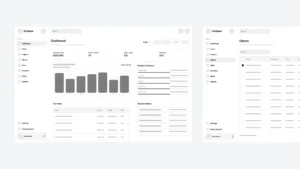
Wireframes are typically rendered in greyscale: boxes represent images or content blocks, lines represent text, and labels explain what each element is or does. They look unfinished because they are, that is the point.
What wireframes are for:
- Defining the information architecture of a product, what content and functionality appears on each screen, and in what hierarchy
- Mapping user flows, how a user moves from screen to screen to complete a task
- Getting alignment on layout and functionality before visual design work begins
- Fast, low-cost iteration, a wireframe can be redrawn in minutes; a high-fidelity design takes hours
What wireframes are not for:
- Showing what the product will look like, that is the job of the mockup
- Getting feedback on colours, fonts, or visual style — these decisions are not made at the wireframe stage
- Investor presentations, investors cannot visualise a finished product from a wireframe
A common mistake: Founders reviewing wireframes and giving visual feedback, “can we make this section bigger?” or “I don’t like the layout of this screen”, when the wireframe is showing structure, not design. The right question at the wireframe stage is: “Does this layout help users complete the task?” Not: “Does this look good?”
Tools: Figma (low-fidelity mode), Balsamiq, Miro, pen and paper
What Is a High-Fidelity Mockup?
A high-fidelity mockup is a static, pixel-perfect visual representation of how the finished product will look. It includes real colours, real typography, real spacing, real imagery, and real branding. It looks like a screenshot of the finished product, but it does not move and cannot be clicked.
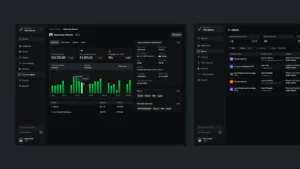
Mockups are produced after the wireframe stage, once the layout and structure have been agreed. They translate structural decisions into visual design decisions: what colour system, what typographic hierarchy, what component styles, what spacing system. They are typically created in Figma or similar design tools and reviewed as static screens.
What mockups are for:
- Showing exactly how the finished product will look before development begins
- Getting sign-off on visual design direction, colours, typography, brand expression, component style
- Briefing developers, a high-fidelity mockup with a complete design system gives developers everything they need to build accurately
- Marketing materials – mockups of the product are used in pitch decks, landing pages, and investor presentations
What mockups are not for:
- Testing whether the product is usable, a static screen cannot reveal whether users can navigate the product
- Investor demonstrations of product flow, you cannot click through a mockup
A common mistake: Treating a mockup as the final design deliverable and handing it to developers without an interactive prototype. Developers build from mockups, but without seeing the intended interactions, transitions, and states, they make assumptions. Those assumptions compound into a product that looks right but behaves unexpectedly.
Tools: Figma, Sketch, Adobe XD
What Is a Prototype?
A prototype is an interactive, clickable simulation of the product built from the mockup designs. It looks like the finished product and behaves like it – users can navigate between screens, trigger interactions, see transitions, and experience the core user flow, but it is not built in code. It is a Figma prototype, or equivalent, connected with interactions and flows.
Prototypes are the final design deliverable before development begins. They are used for usability testing (watching real users attempt tasks in the prototype), investor demonstrations (clicking through the product live in a meeting), and as the primary briefing document for the development team.
What prototypes are for:
- Usability testing – watching real users navigate the product reveals flow problems, confusing labels, and missing states that are invisible in static mockups
- Investor meetings – a clickable prototype demonstrates the product vision more powerfully than any slide
- Developer briefing – the prototype is the source of truth for how the product behaves, not just how it looks
- Internal alignment – stakeholders can experience the product before it is built
What prototypes are not for:
- Replacing actual development – a prototype is not the product; it simulates the product
- Capturing edge cases and error states comprehensively – a prototype covers the happy path and key flows; full edge case coverage happens in development
A common mistake: Building a prototype in code (i.e. starting development) before the design is validated. This is significantly more expensive than prototyping in Figma, changes in a Figma prototype take minutes; changes in code take hours or days.
Tools: Figma (with prototype connections or Figma Make)
The 3 Deliverables Side-by-Side
| Wireframe | High-Fidelity Mockup | Prototype | |
|---|---|---|---|
| Fidelity | Low | High | High |
| Interactive? | No | No | Yes |
| Has colour/branding? | No | Yes | Yes |
| Purpose | Structure and layout | Visual design | User testing and demonstration |
| Question it answers | What goes where? | What does it look like? | How does it work? |
| Stage | Early – before visual design | Mid – after structure agreed | Late – before development |
| Time to produce | Hours | Days | Days (built from mockup) |
| Right feedback to give | “Does this layout support the user’s task?” | “Does this look right and match the brand?” | “Can I complete this task? Is anything confusing?” |
| Used for investor pitches? | Rarely | Sometimes | Yes — most effective |
| Developer-ready? | No | Partially | Yes (with design system) |
What You Should Ask for at Each Stage
One of the most common sources of confusion in a design engagement is founders not knowing which deliverable to ask for, or reviewing the wrong one at the wrong time. Here is a practical guide.
Ask for wireframes when:
- You are at the beginning of a product design engagement and need to define the structure before visual design begins
- You want to align the team on what each screen contains and how users move through the product
- You need a fast, low-cost way to explore multiple layout approaches before committing to one
Ask for high-fidelity mockups when:
- The structure is agreed and you need to see what the product will actually look like
- You are building a pitch deck and need product screens that represent the finished design
- You are briefing a development team and need pixel-accurate specifications
Ask for a prototype when:
- You want to test whether users can actually navigate the product before development begins
- You are presenting to investors and want to demonstrate the product live
- You need the development team to understand not just what the product looks like but how it behaves
How Inity Uses All Three
At Inity, every product design engagement moves through all three stages in sequence. Wireframes are produced during or immediately after Discovery Week, they define the structure of the validated MVP scope. High-fidelity mockups follow once the wireframes are agreed, they apply Inity’s design system and the client’s brand to the validated structure. The clickable prototype is built from the mockups and is the primary deliverable handed to the development team, who, at Inity, are the same team that designed the product.
That last point matters. When design and development are in the same team, the prototype does not get lost in translation. The team that clicked through the prototype during design is the same team that builds it. The gap between what was designed and what gets built is zero.
→ Starting a new SaaS product? Book a Discovery call to understand how Inity moves from wireframes through to a working product in a single engagement.
Frequently Asked Questions
A wireframe is a low-fidelity structural sketch, greyscale boxes and text, that defines the layout and information hierarchy of a screen without any visual design. A mockup is a high-fidelity, static visual showing exactly how the finished screen will look, including colours, typography, branding, and imagery. Wireframes answer "what goes where?" Mockups answer "what does it look like?" Wireframes are produced first; mockups follow once the structure is agreed.

Ready to Build Your SaaS Product?
Free 30-minute strategy session to validate your idea, estimate timeline, and discuss budget
What to expect:
- 30-minute video call with our founder
- We'll discuss your idea, timeline, and budget
- You'll get a custom project roadmap (free)
- No obligation to work with us