Why Procurement Software Has a UX Problem (And What It Costs)?

The leading cause of procurement software failure is not bad technology. It is not integration issues. It is not budget. According to a Forrester study, the number one cause of failed procurement transformation is low supplier adoption – and close behind it, at 27%, is poor adoption by internal users. Most procurement platforms are built to process transactions, enforce compliance, and generate reports. They are not built for the people who have to use them every day. At Inity Agency, we have designed and built procurement software for platforms including TealBook, Cirtuo, and SenseCloud – and the UX problem in this space is not subtle. It is structural, persistent, and expensive.
The Problem No One Talks About in Procurement Tech
Procurement technology is a multi-billion dollar industry. SAP Ariba, Coupa, Oracle, Ivalua, Jaggaer – major platforms that global enterprises pay 7 and 8-figures to implement. And yet, across organisations of every size, the same pattern repeats: the system goes live, adoption is lower than projected, users find workarounds, and within 18 months half the intended functionality is underused.
The standard explanation is “change management.” Train users better. Hire a system administrator. Run adoption workshops.
The real explanation is simpler and harder to fix: the software is difficult to use.
Procurement systems were built, historically and in many cases still today, around the needs of the data model, the compliance ruleset, and the IT department that manages the deployment. They were not built around the needs of the procurement manager who needs to make a sourcing decision in 20 minutes, the operations requester who buys goods twice a month and cannot remember where the approval workflow starts, or the supplier who is trying to register on yet another portal with yet another set of required fields.
The consequence is not just user frustration. It is measurable financial loss.
Who Actually Uses Procurement Software – and Why Designing for One of Them Is a Failure
The UX failure in procurement software starts with a fundamental misunderstanding of the user base. Most platforms are designed as if there is one user: a professional procurement analyst who uses the system all day, knows the nomenclature, and has been trained on the workflow. In reality, procurement software serves at least three completely different user populations, and each requires a different design approach.
The expert buyer / category manager Uses the system daily. Has domain expertise. Needs powerful search, complex filtering, data visualisation, and the ability to build and track category strategies over time. Tolerates complexity if it delivers analytical depth. Frustrated by systems that oversimplify or bury the data they need in export-dependent workflows.
The occasional requester May use the procurement system once a month. Has no procurement training. Just needs to buy something. Is coming from a world where they can order anything on Amazon in three taps. Encounters a multi-step approval workflow, a supplier catalogue with no search, and a form that requires a cost centre code they do not know. Gives up and emails the supplier directly.
The supplier Is being asked to register on a portal, upload certifications, respond to RFx events, and update their company information. Has no incentive to make this easy for the buyer. Is juggling portals from multiple enterprise clients, each with their own fields, formats, and update cycles. Abandonment rates on supplier portals are high, and every abandoned registration is either a gap in the supplier data or a relationship that starts with friction.
These three user types have different mental models, different technical fluency levels, different frequencies of use, and different definitions of success. A procurement platform that designs only for the expert buyer will lose the occasional requester to maverick spend. A platform that oversimplifies for the occasional requester will frustrate the category manager into exporting everything to Excel. A platform that ignores the supplier experience will have bad supplier data, and bad supplier data, at an estimated $2,431 per record, has a compounding cost.
The Five Specific UX Failures in Procurement Software
1. Information architecture built for the database, not the user
Enterprise procurement platforms typically present information the way the data model is structured, not the way a user thinks about their work. A category manager looking for all indirect spend with suppliers in a specific geography should not have to understand the platform’s taxonomy before they can construct that query. A requester looking for “office chairs” should not have to know whether that lives in Facilities, MRO, or Indirect Goods in the classification hierarchy.
When the interface reflects the database structure rather than the user’s mental model, every interaction requires translation. That translation creates friction, errors, and, eventually, abandonment.
2. The multi-role problem: one interface trying to serve everyone
Most procurement platforms present the same interface to every user regardless of their role, frequency of use, or expertise. The result is an interface that is simultaneously too complex for the occasional requester and too surface-level for the expert buyer.
The occasional requester sees a dashboard full of options they will never use, contract milestones, supplier scorecards, spend analytics modules, and cannot find the simple purchase request form they came for. The category manager wants to drill into category-level spend data with filters and is presented with a default homepage designed to look accessible rather than functional.
Role-adaptive interfaces, where the experience is shaped by who is logged in and what they are trying to do, are not technically complex to implement. They require design investment and user research. Most procurement platforms have not made that investment.
3. Cognitive overload from feature accumulation
Procurement platforms are sold on feature lists. More features mean a stronger RFP response, a better Gartner Magic Quadrant position, a longer sales cycle justification. The consequence is products with extensive functionality where finding and using any specific capability requires navigating layers of menus, sub-modules, and configuration options.
The average enterprise procurement platform has significantly more functionality than any single user needs in a given session. Without progressive disclosure, showing users what they need for their current task, not everything the platform can do, the cognitive load of navigating the system becomes the primary barrier to using it effectively.
This is particularly acute for new users and for organisations implementing a platform for the first time. The onboarding experience in most enterprise procurement tools is not designed to guide users to value quickly. It is designed to expose functionality.
4. Data entry UX that creates data quality problems downstream
Procurement platforms are data platforms. The quality of the data they generate, supplier records, spend classification, contract terms, approval histories, directly determines the value of the analytics and decision-support they provide. Poor data quality is a well-documented problem across procurement organisations. The estimated cost of a single bad supplier record is $2,431.
A significant cause of poor data quality is poor data entry UX. Forms with ambiguous field labels. Free-text fields where structured data should be captured. Required fields that users do not understand, leading to placeholder entries. Taxonomy selection interfaces where the right classification is not obvious, so users choose the nearest plausible option.
When the interface makes it difficult to enter correct data, users enter incorrect data. The data quality problem then cascades: bad spend classification produces wrong analytics, wrong analytics drive bad sourcing decisions, bad sourcing decisions cost money.
5. Supplier experience as an afterthought
The supplier-facing side of procurement platforms is consistently the most neglected from a UX perspective. Supplier portals are often treated as an administrative necessity, a form for suppliers to fill in, rather than a product that requires user-centred design.
The result is portals with high abandonment rates, low completion rates for supplier profiles, and data that is out of date the moment it is submitted. Suppliers who find registration difficult do not call the buyer to ask for help. They submit incomplete information, or they do not complete the process at all.
Improving supplier portal UX, simpler registration flows, progressive profile completion, clear guidance on what is required and why, directly improves supplier data quality. It also signals to suppliers that this buyer values their time. That signal matters in supplier relationships.
What Poor Procurement UX Actually Costs
The costs of poor procurement UX are distributed across the organisation in ways that are rarely attributed to the interface:
| Consequence | How it manifests | Estimated cost |
|---|---|---|
| Maverick spend | Users bypass system → spend outside contract → no leverage, no compliance | 10–40% of indirect spend typically off-contract |
| Low adoption | Features unused → ROI on platform investment not realised | Technology investment wasted |
| Bad supplier data | Incomplete portals, manual cleanups, wrong decisions | $2,431 per bad supplier record |
| Training overhead | Complex UI requires extensive onboarding and ongoing support | High and recurring |
| Delayed sourcing cycles | Friction in the workflow extends time-to-contract | Opportunity cost on every category |
| Talent friction | Poor tools frustrate procurement professionals and affect hiring | Retention risk in a talent-scarce function |
The Gartner figure on enterprises wasting 40% of IT budgets on mismatched solutions does not fully capture the downstream cost of interfaces that work technically but fail usability. The implementation succeeds; the adoption does not; the value is never realised.
What Good Procurement UX Looks Like
The procurement platforms that have moved beyond the UX problem share a set of design principles that are not technically complex to state, but require deliberate investment to execute:
Design for the user’s workflow, not the system’s data model. The interface should reflect how a category manager thinks through a sourcing decision or how a requester thinks about buying something, not how the database is structured.
Role-adaptive experiences. The occasional requester and the expert buyer should not see the same homepage. Identifying user types and designing distinct entry points and workflows for each is foundational, not optional.
Progressive disclosure. Show users what they need for their current task. Advanced functionality exists but does not dominate the default view. Complexity is accessible, not imposed.
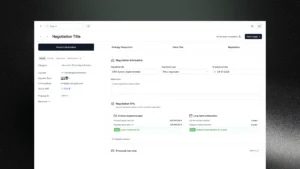
Guided workflows for complex tasks. Category strategy development, supplier risk assessment, contract negotiation, these are cognitively demanding tasks. A well-designed interface structures these tasks as a guided process with clear stages, rather than a blank canvas surrounded by options.
Supplier experience as a product. The supplier portal is not a form. It is a product that suppliers use to transact with your organisation. It should be designed with the same care as the buyer-facing interface, including progressive profile completion, clear field guidance, and mobile accessibility.
The Procurement Tech UX Opportunity
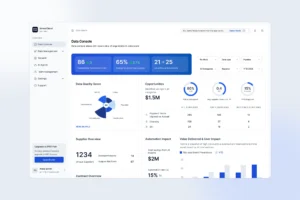
The procurement technology market is at an inflection point. AI is being integrated into every platform, spend classification, supplier risk monitoring, contract intelligence, category strategy generation. Cirtuo, acquired by Coupa in 2025, built its entire product around a guided, interview-style workflow for category strategy that dramatically reduces the cognitive burden on category managers. TealBook built a supplier data platform where AI continuously enriches supplier records, reducing the reliance on manual portal entry. SenseCloud‘s Aura agents monitor the procurement ecosystem autonomously, surfacing risks and opportunities without requiring users to query dashboards.
Each of these represents a fundamentally different design approach to the UX problem: reduce the cognitive load on the human, automate what the system can handle, and surface the right information at the right moment rather than requiring users to find it.
The platforms that will win the next decade of procurement technology are not the ones with the most features. They are the ones that make their features usable, by category managers, by occasional requesters, and by suppliers. That is a design problem before it is a technology problem.
Conclusion
Procurement software has a UX problem because it was built for compliance before it was built for humans. The cost of that problem is real: maverick spend, failed implementations, bad supplier data, and underutilised technology investments. The solution is not simpler software, procurement is genuinely complex.

The solution is design that meets that complexity with clarity: workflows built around how procurement professionals actually think, interfaces adapted to who is using them, and supplier experiences treated as products rather than administrative overhead. The procurement technology platforms that have figured this out, Cirtuo’s guided strategy creation, TealBook’s automated supplier enrichment, SenseCloud’s AI agents, are winning because they reduce friction rather than adding to it.
→ Building a procurement platform or redesigning an existing one? Inity’s team has designed and shipped procurement software for enterprise clients globally.
Frequently Asked Questions
According to Forrester research, the leading causes of failed procurement transformation are low supplier adoption (30%) and poor internal user adoption (27%) – both of which are fundamentally UX problems. Most procurement platforms are designed around compliance requirements and system architecture rather than the workflows of the people who use them. When the system is difficult to use, internal users bypass it and suppliers abandon portal registration, creating maverick spend, data quality failures, and unrealised technology ROI.

Ready to Build Your SaaS Product?
Free 30-minute strategy session to validate your idea, estimate timeline, and discuss budget
What to expect:
- 30-minute video call with our founder
- We'll discuss your idea, timeline, and budget
- You'll get a custom project roadmap (free)
- No obligation to work with us