How to Design Empty States in SaaS Products?

Empty states are one of the most underinvested surfaces in SaaS product design and one of the highest-leverage points for improving activation. When a new user completes registration and enters the product for the first time, they are looking at an empty state, a screen that has no data, no content, no history. What they see determines whether they understand what to do next, feel capable of getting started, and believe the product can deliver the value they came for. Most SaaS products treat empty states as a design afterthought: a grey box with “No data yet” text, or a blank screen with a create button buried somewhere in the navigation. Neither tells the user what to do, why to do it, or what the screen will look like when it is working. At Inity Agency, empty state design is a first-class deliverable in every product engagement, because it is the first experience every user has of the product, and first experiences determine whether they become second experiences.
The 5 Types of Empty State
Not all empty states are the same. Designing them without distinguishing between types produces a one-size-fits-all treatment that works poorly for each specific case.
Type 1: First-Use Empty State
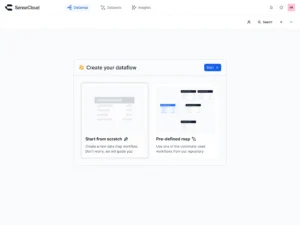
The most important and most commonly underdesigned. A new user has registered, completed any required setup, and arrived at the main product interface for the first time. Everything is empty. They have no history, no data, no reference points.
This user is at maximum motivation; they just signed up because they wanted to solve a problem, and have maximum uncertainty about what to do next. The first-use empty state must convert both of those conditions: maintain the motivation by showing what the product looks like when it is working, and resolve the uncertainty by providing a clear, low-friction first action.
Type 2: User-Cleared Empty State
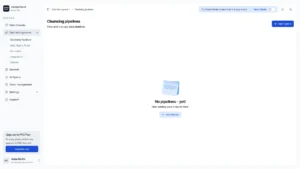
The user has explicitly deleted or archived all their data. This is a different psychological state from first use: the user knows the product and has chosen to clear it. The design here is simpler, acknowledge the cleared state, offer a way to restore or start fresh, and do not over-explain what the product does to someone who already knows.
Type 3: No-Results Empty State
A search or filter has returned no results. The most common error in this type is displaying a generic “No results found” without giving the user a path forward. The no-results empty state should always suggest why there might be no results (did the filter eliminate all items?) and offer a clear recovery action (clear the filter, broaden the search, check the spelling).
Type 4: Error Empty State
Data failed to load: network issue, API error, rate limit. This is not technically an empty state but is often designed in the same location. It requires its own distinct treatment: an honest explanation of what went wrong, what the user can try (refresh, try again later), and whether data loss occurred.
Type 5: Congratulatory Empty State
A task has been completed, all items in a queue have been processed, all notifications have been read, all issues have been resolved. This is the positive version of empty: the screen is empty because the user has done everything. The design should acknowledge the achievement, not display the same “no items yet” state as the first-use empty state.
The 4 Components of a Good Empty State
Component 1: Context – What Is This Area For?
The user looking at an empty compliance dashboard does not know whether they are looking at a dashboard that will populate automatically, one that requires them to add data manually, or one that requires a configuration step before anything appears. Context resolves this confusion.
A clear heading or subheading that explains the purpose of the empty area, written in plain language, not product terminology, is the minimum. “Your compliance calendar will show your upcoming certificate renewal dates here” is the context. “No compliance events” is not.
Component 2: Preview – What Will It Look Like With Data?
The preview is the most underused element of empty state design and one of the highest-converting. Showing the user what the screen will look like when it contains data — either through a static illustration, a sample data screenshot, or an animated preview- resolves the fundamental uncertainty of an empty state: does this product actually work?
Sample data is the strongest form of preview. Pre-populating the empty state with realistic placeholder content — fake compliance records, sample projects, example conversations — gives the user a working model of the product before they have invested any effort. They can explore, understand the interface, and see the value before they are ready to enter their own data.
For products where sample data would be confusing or potentially misleading (financial products, health records, compliance documentation), an illustration or annotated screenshot is the appropriate alternative.
Component 3: Action – One Clear First Step
Every first-use empty state should contain a primary action: the lowest-friction version of the first meaningful thing the user can do in this area of the product. Not multiple actions, not a list of getting-started tips — one action, clearly labelled with the specific thing it will do.
The action should be the thing that moves the user toward the activation moment, the point at which they experience the product’s core value for the first time. If that action requires setup that has not yet been completed, the action should point to setup. If the action requires information the user might not have to hand, acknowledge this and offer a simpler first step.
The label of the action button is a design decision that affects conversion significantly. “Add your first property” (specific, concrete, low-commitment) converts better than “Get started” (vague) or “Create a new compliance record” (sounds like admin work).
Component 4: Reassurance – This Is Normal and Temporary
Empty states in new products can feel alarming, as if something has gone wrong, or the product is not working. A brief reassurance that the empty state is normal and temporary reduces the anxiety that causes users to abandon: “Once you add your first property, your compliance calendar will appear here automatically.”
This reassurance is particularly important for products where the empty state might feel like a technical failure, dashboards that appear to have loaded but contain nothing, analytics pages that show zero data, activity feeds with no entries.
The Sample Data Pattern: The Highest-Converting Approach
For data-heavy SaaS products: dashboards, project management tools, analytics platforms, compliance trackers – sample data is the most effective empty state pattern.
Sample data is pre-populated placeholder content that shows the product working with realistic (but clearly fictional) data. The user can explore the interface, understand the features, and see what value the product delivers before they invest the effort of entering their own data.
The pattern works because it resolves the fundamental hesitation of a new user facing a blank product: “I don’t know if this will work for my situation.” Seeing realistic data in the interface — a populated compliance calendar, a sample project with tasks assigned, an example analytics dashboard — gives the user a working mental model of the product that makes them more likely to invest the effort of setup.
Implementation considerations:
Make the sample data clearly fictional. Use obvious placeholder names (“Sample Property,” “Acme Corp,” “Example Compliance Record”) and add a clear visual indicator or banner that the data is a demo. Users who cannot distinguish sample data from real data will become confused when they try to interact with it.
Give the user a clear way to dismiss or replace sample data. A prominent “Set up your own data” action, or sample data that automatically disappears when the user adds their first real record, maintains the value of the preview while removing the noise once the user is ready to begin.
Keep sample data realistic. Placeholder data that does not match the real product use case is misleading. A compliance platform should show real-looking compliance record types, dates, and statuses — not generic “Item 1,” “Item 2” entries.
Empty States as Onboarding
The first-use empty state is not just a design problem – it is an onboarding problem. It is the moment when the gap between “signed up” and “activated” is either bridged or broken.
The most effective empty states treat the first-use experience as a guided onboarding moment: they tell the user what to do, show them what success looks like, and make the first step feel achievable rather than daunting.
This means the empty state should be consistent with the onboarding flow – the language should match, the first action should match, and the progress indicators should be aware of what the user has already done in other parts of the product. An empty state that presents the first step as something the user has already completed is confusing; an empty state that acknowledges the user’s progress and presents the logical next step is productive.
How Inity Designs Empty States
At Inity, empty states are specified during the user flow design phase, alongside the happy-path screens, not as an afterthought. Every screen that can be empty is designed in its empty state first, because the empty state is the first experience for every new user.
The specification includes: the type of empty state, the context text, the preview approach (illustration, sample data, or screenshot), the primary action and its label, and the reassurance language. This is documented in the same Figma file as the populated screens, so that the visual treatment is consistent and the content is reviewed alongside the product content rather than separately.
Conclusion
An empty state is the product’s first impression for every user who has ever signed up. Most products treat it as a loading screen for data that does not yet exist. The products that achieve high activation rates treat it as a designed experience that guides, previews, and motivates, one that tells the user what this area is for, shows them what it will look like when it is working, gives them one clear action to take, and reassures them that the empty state is normal and temporary. The difference between a product that activates 80% of trial users in the first session and one that activates 20% is often not the product itself; it is how the empty state handles the gap between signup and value.
→ Designing a SaaS product and want empty states treated as first-class design deliverables? Book a call with Inity.
Frequently Asked Questions
An empty state is the design of a screen or component when it contains no data – typically experienced by new users immediately after signup, or by any user when a feature has not yet been used or when a search returns no results. There are five types: first-use (new user, no data), user-cleared (all data deleted), no-results (search or filter returned nothing), error (data failed to load), and congratulatory (task completed). Each type requires a distinct design approach because the user's context and needs are different in each case.

Ready to Build Your SaaS Product?
Free 30-minute strategy session to validate your idea, estimate timeline, and discuss budget
What to expect:
- 30-minute video call with our founder
- We'll discuss your idea, timeline, and budget
- You'll get a custom project roadmap (free)
- No obligation to work with us