Business Application Security in 2026: Why Hackers Don't Always Need Your Password

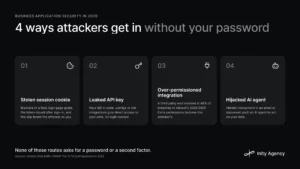
Business application security in 2026 depends less on the login screen and more on what happens after it. Stolen session tokens, leaked API keys, over-permissioned integrations and AI agents that follow outside instructions all let attackers skip the password, and a third party was involved in 48% of the breaches in Verizon’s 2026 Data Breach Investigations Report.
Inity Agency, a product design and development studio that builds SaaS products and business web apps, wrote this guide to explain where these gaps come from and how to design a more secure application from the start.
Why Aren’t Passwords and Two-Factor Authentication Enough Anymore?
Passwords and two-factor authentication protect the moment someone signs in, not the session that follows. If an attacker steals the session token an application issues after login, they can often use the account without a password or a second factor. Some forms of MFA, such as SMS codes, can also be phished.
Stolen passwords are still part of the picture, but they are no longer the main way in. In Verizon’s 2026 DBIR, exploited vulnerabilities started 31% of breaches and credential abuse 13%. It is the first time in the report’s 19-year history that stolen credentials were not the top entry point.
Think about what happens in almost any company every morning. An employee opens a work app, types a password, taps “approve” on their phone and gets in. The app then creates a session, usually a token or cookie, so the employee does not have to log in again on every page.
Whoever holds that token is treated as that person. If an attacker steals it, they may be able to use the account with no password and no new 2FA prompt, depending on how the app handles sessions. From the app’s side, the attacker’s requests look like a valid session.
Real-world example: In March 2023, a content editor at Linus Media Group opened an email attachment that looked like a work PDF but was malware. It pulled session cookies from the browser, and attackers took over three YouTube channels, including Linus Tech Tips, without needing the password or MFA. They then used the channels to stream a crypto scam.
Two-factor authentication is still one of the most effective protections an account can have, and every business should use it. MFA methods differ a lot in how well they resist phishing:
| MFA method | How it works | Phishing resistance | Main weakness |
|---|---|---|---|
| SMS codes | One-time code sent by text message | Low | Codes can be phished or intercepted through SIM swapping |
| Authenticator app codes | Time-based code generated on the phone | Low | A fake login page can ask for the code and relay it in real time |
| Push notifications | User taps “approve” on a prompt | Low to medium | Repeated prompts can wear users down; number matching reduces the risk |
| Passkeys and FIDO2 security keys | Cryptographic key tied to the real website | High | Do not help if the device is compromised or an active session is stolen |
None of this means authentication has stopped working. It means one successful login should not buy unlimited trust for everything the user does afterward, and a well-designed system keeps checking after sign-in.
Who Actually Has Access to Your Company’s Data?
Far more identities than employees can access a company’s data. Contractors, CRM and payment integrations, automation tools, internal services and AI agents all hold some level of access, and each one can be misused. Verizon’s 2026 DBIR found that breaches involving a third party rose 60% in a year and now make up 48% of all breaches.
Take a SaaS company with 30 employees, a CRM, an invoicing system and a handful of automated workflows. One integration exists only to check whether invoices have been paid, so it needs nothing more than permission to read invoice statuses.
During development, someone gave it broader access to get things working, and nobody went back to narrow it. Now it can also edit invoices, delete records and export customer data. Nobody notices while everything runs. The day that integration is compromised, every one of those extra permissions belongs to the attacker.
The principle of least privilege is the fix: each user, application or service gets only the access its task requires, and nothing on top of that. Experienced engineering teams apply it to software as strictly as they do to people.
Identity and Access Management (IAM) is how teams enforce that principle. A good IAM setup checks who or what is asking for access, and it also answers four questions:
- Which systems and resources can this identity reach?
- What is it allowed to do with them?
- Under what conditions should access be allowed?
- When should access expire or be revoked?
An API integration has an identity, a background service has one, and so can an AI agent. If something can touch your business data, you should be able to say what it is, why it has access and exactly what it is allowed to do.
How Is AI Changing Cyberattacks on Businesses?
AI mostly makes existing cyberattacks faster, cheaper and more convincing rather than inventing new ones. Phishing emails now match a company’s tone and mention real people, and AI helps attackers with reconnaissance and attack scripts. Businesses also create a new risk inside their own systems when they give AI agents access to real tools and data.
A few years ago, a fake email usually gave itself away through poor grammar, odd formatting, a generic greeting or a strange request. Today an employee can receive what looks like a routine message from a supplier they deal with every month, asking them to review an invoice or update payment details, with nothing in it that looks off.
AI can also sift through public information about a company and help write the scripts used in an attack. That does not guarantee success, but it lowers the effort needed to try.
Inside the company, AI use is growing faster than the rules around it. Verizon’s 2026 DBIR reports that frequent employee use of unapproved AI tools rose from 15% to 45% in a single year.
What Is Prompt Injection, and Why Does It Matter for AI Agents?
Prompt injection is an attack in which instructions hidden in content an AI model reads, such as an email, web page or document, push the model to do something its owner never asked for. The risk grows when the model is connected to real tools, because the result becomes an action rather than a wrong answer.
Picture an AI assistant that reads incoming email, updates CRM records and prepares invoices. One email contains text telling the agent to pull confidential customer data and send it to an outside address. The sender has no authority to request that, but the instruction sits inside content the agent was asked to process. If the system treats outside content as trusted instructions and the agent has broad permissions, it may try to carry the request out.
OWASP’s 2026 Top 10 for LLM Applications keeps prompt injection at No. 1. It also moves excessive agency, meaning an AI system with more permissions or autonomy than its task needs, from sixth to third place. Once a model starts calling tools and taking actions, OWASP points teams to its separate Top 10 for Agentic Applications as well.
Better prompts reduce the risk but do not remove it, so the control has to sit outside the model.
An AI agent can suggest or request an action, but the application decides whether it is allowed. That check belongs in the security architecture, and the language model should not be the one making it. Teams adding AI features and agents to a SaaS product should plan this boundary before the first agent goes live.
What Does a Secure Business Application Look Like?
A secure business application assumes that any single account, session or integration can be compromised and limits what that one piece can do. Five design areas make this work: phishing-resistant authentication, server-side authorization, containment, monitoring after login and scoped AI agents. A checklist of security tools cannot replace an architecture designed around these areas.
- Start with phishing-resistant authentication. For admin and other business-critical accounts, use passkeys or FIDO2 security keys. Then decide how sessions behave: how long one stays valid, whether it can be revoked immediately, and whether sensitive actions ask the user to verify again. These choices decide how much an attacker can do with a stolen session.
- Check permissions on every protected request. Being logged in does not mean being allowed to do everything, and hiding a button in the interface is not a security control. The server has to enforce authorization. In a multi-tenant SaaS app, an employee should see invoices from their own company and never those of another customer, and the backend must check that boundary on every request.
- Design for the possibility of compromise. Ask what happens if one account, service or integration is taken over. Can it reach the whole database, change permissions or talk to unrelated internal systems? Separating privileges, isolating sensitive services and limiting data access shrink the damage. A service that only needs to read data should not be able to change or delete it.
- Watch what happens after login. Authentication says someone signed in, not that everything they do next is legitimate. If an account that normally downloads five or ten documents a day suddenly tries to export 50,000 customer records, the system should log it. Depending on the risk, it can ask for extra verification, pause the operation or alert an administrator.
- Give AI agents their own scoped identity. An agent that reads customer emails has no reason to export the customer database, and an agent that prepares invoices does not need to approve payments. Sensitive actions should pass server-side checks, and high-impact or hard-to-reverse actions should need human approval. That way the application can refuse an operation when the model misreads a request or meets malicious instructions.
Two common ways to enforce the second point are role-based and attribute-based access control:
| Model | Decides access by | Works well for | Limitation |
|---|---|---|---|
| RBAC (Role-Based Access Control) | The user’s role, such as administrator, manager or employee | Small teams and simple permission sets | Roles multiply as the product grows |
| ABAC (Attribute-Based Access Control) | Context: the user’s organization, the record requested and the action attempted | Multi-tenant SaaS and fine-grained data access | Takes more design work up front |
Many products combine the two: roles set the broad limits and attributes handle the edge cases. Getting this right is far cheaper during web app development than after launch.
What Is Zero Trust, and Does Your Business Need It?
Zero Trust is a security approach in which no user, device or service gets trusted automatically because of its network location or an earlier login. The system checks every request against identity, permissions, the requesting device or service and the resource involved. NIST defines the model in SP 800-207, and no single product can deliver it.
Companies used to treat anything inside their own network as more trustworthy than anything outside it. That assumption stops working once people work remotely, applications run in the cloud and dozens of outside services connect to company systems. Under Zero Trust, being on the company network does not make a request trustworthy, and neither does a successful login an hour ago.
The name sounds stricter than the practice. Zero Trust does not mean asking employees to prove who they are every few minutes. It means access decisions rest on evidence about each request instead of broad assumptions about trust.
Most businesses need Zero Trust as a direction rather than a purchase. Teams that already use least privilege, server-side authorization and session controls are partway there.
Where Should a Business Start With Application Security?
Businesses should start application security by mapping who and what already has access to their systems, then ranking the risks by what a compromise would cost. An honest access review usually reveals more than another generic security checklist, and none of the steps requires replacing the whole infrastructure.
- List every identity with access. Include employees, admins, contractors, integrations, API keys, background services and AI agents.
- Remove access nobody uses. Look for former employees, unused integrations and API keys that have not been rotated in years.
- Rank actions by consequence. Deleting customer records, changing payment details and viewing a public dashboard are very different actions, and your controls should treat them differently.
- Move admin accounts to phishing-resistant MFA first. They have the widest reach, so they get the strongest protection before anyone else.
- Run an assume-breach exercise. Pick one account, assume it is already compromised and trace what an attacker could realistically reach from it.
- Close the widest paths first. If one account can move through connected systems to sensitive business data, fix that before anything smaller.
Good security architecture accepts that some attacks will succeed and makes sure a single one cannot turn into a company-wide problem.
Sources
- Verizon, Vulnerability exploitation top breach entry point, 2026 industry-wide DBIR finds
- SecurityWeek, Verizon DBIR 2026: Vulnerability Exploitation Overtakes Credential Theft as Top Breach Vector
- CyberArk, LTT Attack Targets Session Cookies to Push Crypto Scam
- CISA, Implementing Phishing-Resistant MFA
- OWASP GenAI Security Project, OWASP GenAI LLM Top 10 2026
- Cloud Security Alliance, The OWASP Top 10 for LLM Applications (2026): What Changed and Why It Matters
- NIST, SP 800-207: Zero Trust Architecture
Inity Agency’s view is that these decisions belong at the start of a software project, while the architecture is still being defined and changes are cheap.
Next step: Building a SaaS product or business web app that handles customer data? Talk to Inity Agency about designing it with security built in from day one.
What Do People Ask About Business Application Security?
People most often ask whether hackers can bypass two-factor authentication, what session hijacking is, what the principle of least privilege means, whether passkeys are safer than SMS codes, and how to secure AI agents that use company data. The five answers below address each question directly and can be read independently.
Frequently Asked Questions
Yes. The most common route is stealing the session cookie created after login, which lets an attacker use the account without a password or a second factor. SMS and app codes can also be phished in real time. Passkeys resist phishing, but they do not protect a session that has already been stolen.

Ready to Build Your SaaS Product?
Free 30-minute strategy session to validate your idea, estimate timeline, and discuss budget
What to expect:
- 30-minute video call with our founder
- We'll discuss your idea, timeline, and budget
- You'll get a custom project roadmap (free)
- No obligation to work with us